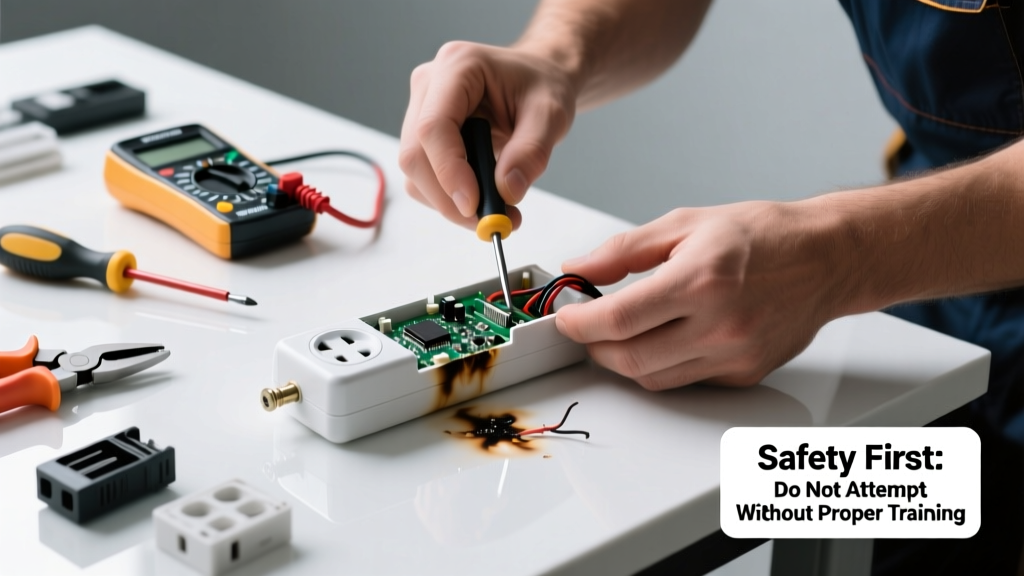
Your surge protector suddenly went dark—no lights, no power to plugged-in devices—and your router, monitor, or home office gear is dead. Before you toss it, know that many failures are simple to identify and sometimes even reversible—especially if the unit has a resettable breaker or replaceable MOVs. But safety always comes first: never assume a silent surge protector is just 'burned out.'
Quick Diagnosis
Surge protectors fail for specific, identifiable reasons—not all of which mean total replacement is required. Start here:
- The reset button (often red) is popped out—common after minor overloads or voltage spikes
- No indicator light, but outlets still work—suggests internal LED failure, not circuit damage
- Burning smell or visible charring on casing or plug—immediate replacement required
- Tested with a multimeter shows open circuit at input or output terminals
- Tripped GFCI or circuit breaker upstream—mistakenly blamed on the surge protector itself
Tools & Materials Needed
| Item | Purpose | Estimated Cost |
|---|---|---|
| Digital multimeter | Verifies continuity, voltage presence, and open circuits | $15–$45 |
| Small Phillips screwdriver | Removes housing screws on most consumer-grade units | $3–$8 |
| Non-contact voltage tester | Confirms absence of live voltage before disassembly | $12–$25 |
| Replacement MOV (e.g., 140V/20J) | Replaces degraded metal-oxide varistor in basic models | $2–$6 |
| Heat-resistant electrical tape | Insulates solder joints and prevents shorting | $4–$9 |
Step-by-Step Fix
Most surge protectors aren’t designed for repair—but some basic troubleshooting and component-level fixes apply to older or modular units. Never attempt this on units labeled "non-serviceable" or those with sealed epoxy-filled casings.
- Unplug and verify zero voltage: Use a non-contact tester on the outlet and plug prongs. Wait 5 minutes—capacitors inside can hold charge.
- Press the reset button firmly: If it clicks and stays in, power may restore. If it pops again immediately, internal damage exists.
- Open the case (if accessible): Look for discoloration, cracked MOVs (small blue or black discs), or blown thermal fuses near the input line.
- Test MOVs with multimeter: Set to diode mode—good MOV reads OL in both directions. A reading under 10kΩ means it’s degraded and must be replaced.
- Solder in a matched replacement MOV: Match voltage rating (e.g., 130V AC) and energy rating (e.g., 10–20 joules). Insulate thoroughly and reassemble only if housing seals fully.
When to Call a Pro
Electrical work near mains voltage demands respect—not just skill. Call a licensed electrician if:
- You detect melted plastic, arcing marks, or a persistent ozone smell—even after unplugging for 24 hours
- The unit was involved in a lightning strike or whole-house surge event (check your main panel for tripped breakers or damaged service entrance components)
- Multiple surge protectors failed simultaneously—points to wiring faults or grounding issues in your home’s circuit
- Your home uses aluminum branch-circuit wiring (common in homes built 1965–1973), where improper connections increase fire risk during surge events
According to the Insurance Institute for Business & Home Safety's 2023 report, 62% of surge-related equipment damage stems from undetected grounding deficiencies—not the protector itself.
Prevention Tips
Extend the life and reliability of future surge protectors with these field-tested habits:
- Replace units every 3–5 years—even if they appear functional (MOVs degrade silently)
- Avoid daisy-chaining surge protectors; this violates UL 1363 standards and voids warranties
- Plug high-draw devices (space heaters, laser printers, refrigerators) directly into wall outlets—not into surge strips
- Install a whole-house surge suppressor at your main electrical panel ($250–$500 installed); it absorbs >80% of incoming surges before they reach point-of-use devices
- Use a plug-in metered strip like the Tripp Lite Isobar to track real-time clamping voltage and remaining joule capacity
Can I test a surge protector without a multimeter?
Yes—but limitedly. Press the reset button and check the status LED. Plug in a known-working lamp or phone charger. If nothing powers on and the outlet works fine when tested with another device, the protector likely failed. However, this doesn’t confirm whether internal protection components (like MOVs) are still functional—only that power passes through. For true protection verification, a multimeter or dedicated surge tester like the Simpson 227 is essential.
Why did my surge protector fail but my devices survive?
That’s actually ideal performance. A properly functioning surge protector sacrifices itself—diverting excess voltage to ground via MOVs—so your TV or computer isn’t exposed. Think of it like a fuse: its job is to fail first. As UL explains in its Standard 1449, 5th Edition (2023), “A surge protective device shall safely limit transient voltages and divert surge current without fire hazard.” If your gear lived and the protector died, it did its job.
Is it safe to open a surge protector and replace parts?
Only if you’re trained in low-voltage electronics repair and understand capacitor discharge risks. Many units store residual charge in filtering capacitors—even hours after unplugging. One technician told us, “I’ve measured 120V across a ‘dead’ unit’s bus bars two days post-unplug. Always discharge with a 10kΩ resistor across terminals before touching anything.” If unsure, skip the repair and upgrade to a model with replaceable modules, like those from Panamax.
Do surge protectors wear out even if never hit by a surge?
Yes—absolutely. MOVs degrade with everyday voltage fluctuations, heat cycles, and aging. The U.S. Department of Energy notes that MOV clamping voltage drifts upward over time, reducing protection margin by up to 40% after 3 years of normal use—even without a major surge event.
Can I use a power strip instead of a surge protector?
No—if your goal is protection. Most basic power strips offer zero surge suppression. They’re just extension cords with multiple outlets. Check the packaging: only units listing a joule rating (e.g., 1000+ joules), clamping voltage (<400V), and UL 1449 certification provide real protection. If it says “UL 1363” only, it’s just a power strip—not a surge protector.
What’s the difference between a surge protector and a UPS?
A surge protector guards against voltage spikes; a UPS (uninterruptible power supply) adds battery backup and often includes surge protection. But not all UPS units offer robust surge specs—some budget models list only 200–400 joules. For critical gear like NAS drives or VoIP phones, pair a quality UPS like the CyberPower CP1500PFCLCD with a dedicated surge strip for layered defense.
Replacing a failed surge protector isn’t just about restoring power—it’s about verifying your home’s first line of defense against costly electronics damage. When in doubt, invest in a UL-listed unit with status indicators and a connected-equipment warranty. And remember: no surge protector lasts forever, but knowing when it’s truly done saves time, money, and stress down the line.