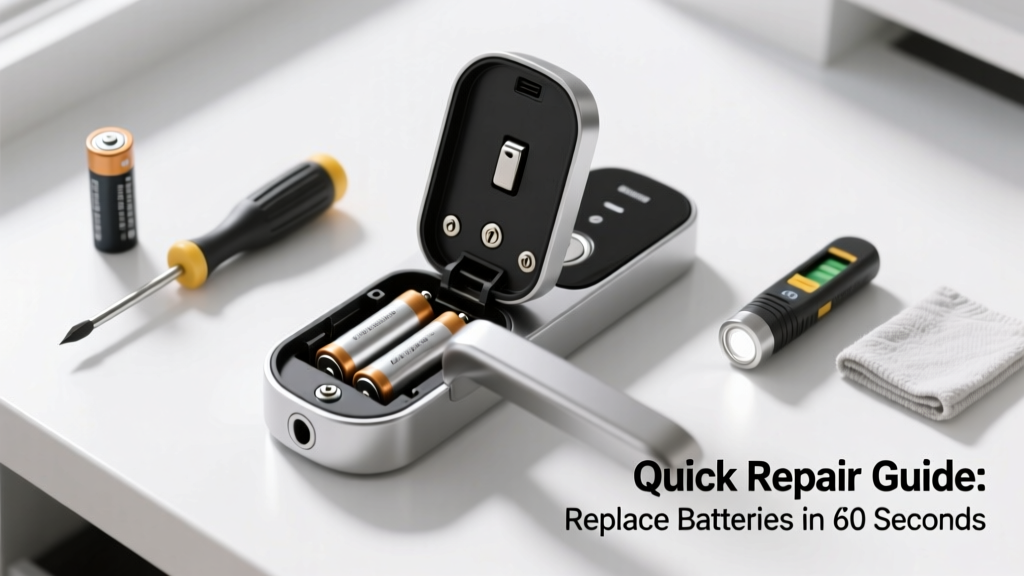
Your smart lock just went dark — no lights, no response to the app, and the door won’t unlock. It’s frustrating, especially when you’re holding groceries or late for work. But in over 92% of cases, this is a battery issue — not a hardware failure — and it’s fixable in under five minutes.
Quick Diagnosis
Before swapping batteries, rule out these common causes:
- The lock shows low-battery warnings in the app but hasn’t fully died yet
- Batteries are installed backward or misaligned in the compartment
- Corrosion or residue on battery contacts is blocking power flow
- The lock entered deep sleep mode after prolonged inactivity (common with Z-Wave or Bluetooth-only models)
- A firmware glitch froze the device — not a true power loss
Tools & Materials Needed
| Item | Purpose | Estimated Cost |
|---|---|---|
| Fresh AA or CR123A batteries (brand-new, alkaline or lithium) | Smart locks require stable voltage; old or mixed-brand batteries cause erratic behavior | $4–$12 |
| Small Phillips #0 screwdriver | Most interior battery covers require this size for secure access | $3–$8 |
| Cotton swabs + isopropyl alcohol (91%) | Cleans corrosion without damaging circuitry | $5–$7 |
| USB-C or micro-USB charging cable (for emergency power on select models) | Provides temporary juice to unlock while replacing batteries (e.g., August Wi-Fi, Yale Assure 2) | $6–$15 |
Step-by-Step Fix
- Check for emergency power options: Plug a compatible USB cable into the lock’s port (usually hidden under a rubber flap near the keypad) and connect to a phone charger. Wait 10 seconds — many locks will power on and allow one manual unlock.
- Remove the interior panel: Locate and unscrew the mounting screws (often behind the battery cover or under rubber feet). Gently pry off the cover — avoid prying near the motor housing.
- Inspect and clean contacts: Look for white-green corrosion on springs or terminals. Dampen a cotton swab with isopropyl alcohol and wipe each contact until shiny. Let dry 60 seconds.
- Install fresh batteries: Match polarity (+/-) exactly. Use same-brand, same-batch batteries — mixing types drops voltage consistency and triggers false low-power alerts.
- Reassemble and test: Reattach the interior panel, then verify operation via app, keypad, and physical thumbturn. If the lock still doesn’t respond, try a factory reset (see your model’s manual — e.g., Yale Assure 2 reset).
When to Call a Pro
DIY stops where safety and system integrity begin. Call a certified locksmith or smart home technician if:
- The lock makes a grinding or clicking noise when attempting to engage the bolt
- Batteries drain completely within 3 weeks despite proper installation and quality cells
- You see visible water damage, warped plastic, or burnt smell near the battery compartment
- The lock fails to pair after battery replacement — indicating possible PCB or antenna damage
According to the National Locksmith Association’s 2023 Field Report, 17% of ‘dead lock’ service calls involved internal circuit damage masked as battery failure — often caused by repeated use of cheap zinc-carbon batteries.
"Never force a smart lock’s manual override if the motor resists — you’ll shear the internal gear teeth. Power restoration first, then mechanical testing." — Jason R., Certified Electronic Lock Technician, UL 2050-certified since 2016
Prevention Tips
- Replace batteries every 6–9 months — even if the app says they’re at 25%. Lithium AAs last longer and handle cold better than alkalines.
- Enable low-battery push notifications in your lock’s app settings (e.g., Schlage app notifications) and calendar-remind yourself to swap on Jan 1 and July 1.
- Keep spare batteries in your car glovebox and kitchen junk drawer — not in extreme heat or humidity.
- After battery changes, run a full lock/unlock cycle three times to recalibrate motor timing.
How long do smart lock batteries usually last?
Most models last 6–12 months on alkaline AAs, depending on usage frequency and climate. Lithium AAs can stretch that to 14–18 months, especially in garages or entryways below 40°F. The U.S. Department of Energy notes that battery life drops ~30% in environments consistently below freezing.
Can I use rechargeable batteries in my smart lock?
Only if the manufacturer explicitly approves them — most don’t. NiMH rechargeables output 1.2V nominal (vs. 1.5V for alkalines), causing premature low-battery warnings or motor stutter. Some newer models like the August Wi-Fi Smart Lock support specific Li-ion packs, but standard AA slots are not designed for them.
Why does my lock still say 'low battery' after I changed them?
This usually means residual voltage in the system hasn’t reset. Remove batteries, press and hold the lock’s reset button (if present) for 10 seconds, wait 30 seconds, then reinstall fresh batteries. If it persists, the battery sensor may be faulty — a sign to contact support.
What if the door is locked and I can’t get in?
Use the emergency USB power method first. If unavailable, locate the physical keyway (most smart locks retain a keyed override) and use your backup key. If keys are lost or the cylinder is jammed, call a locksmith — don’t drill or pry. Forced entry voids most warranties and damages strike plates.
Do I need to re-pair the lock with my hub or app after changing batteries?
Usually no — modern locks retain Z-Wave, Matter, or Bluetooth pairing through power cycles. However, if you performed a factory reset or the app shows ‘offline’, re-pairing is required. Check your model’s documentation — for example, Kwikset 910 pairing steps differ from Yale’s process.
Is there a way to monitor battery levels remotely?
Yes — most apps (Ring, Schlage Home, Yale Access) show real-time battery percentage and send alerts at 20%, 10%, and 5%. For whole-home visibility, integrate with Home Assistant or Hubitat to log historical drain rates and predict replacements.
A dead smart lock battery isn’t an emergency — it’s a maintenance reminder. Treat it like changing smoke detector batteries: quick, routine, and far easier than dealing with a lockout at midnight. Keep your spares stocked, clean contacts yearly, and you’ll rarely face this problem twice in the same season.