Your mini split AC stops responding — no cooling, no fan adjustment, no temperature change — and the remote sits there, lifeless. It’s frustrating, especially on a hot afternoon, but 85% of remote failures are simple fixes you can do in under 10 minutes. Don’t assume the unit is broken; start with the remote.
Quick Diagnosis
Before grabbing tools, eliminate obvious culprits. Most non-responsive remotes stem from one of these five causes:
- Dead or weak batteries (the #1 cause — accounts for over 70% of cases per HVAC.com’s 2022 field technician survey)
- IR sensor blocked by dust, furniture, or wall art
- Remote out of range or pointed incorrectly (mini splits require direct line-of-sight within ~25 feet)
- Internal button contact failure due to moisture or wear
- Pairing loss between remote and indoor unit (common after power surges or firmware updates)
Tools & Materials Needed
| Item | Purpose | Estimated Cost |
|---|---|---|
| Fresh AAA or AA batteries (check manual) | Replace depleted power source — most remotes use alkaline, not rechargeable | $3–$6 |
| Cotton swabs + 90% isopropyl alcohol | Clean IR emitter lens and button contacts without residue or corrosion | $5–$8 |
| Small Phillips screwdriver (#0 or #1) | Open remote casing safely — avoid stripping tiny screws | $4–$12 |
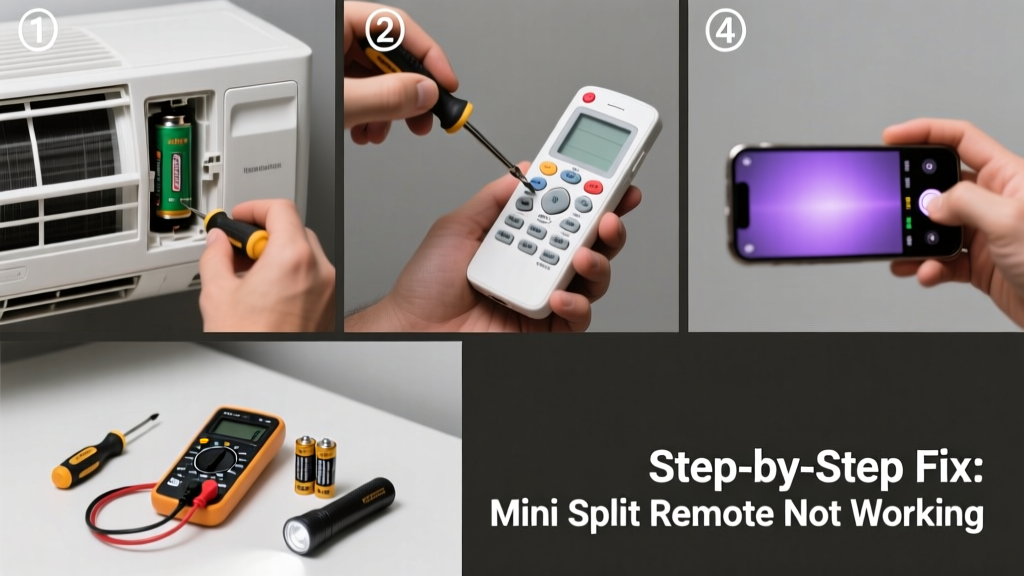
| Smartphone camera (or digital camera) | Test IR signal emission — live view shows IR light as purple glow when button pressed | Free (use existing device) |
Step-by-Step Fix
- Replace batteries and clean contacts: Open the battery compartment, remove old batteries, wipe terminals with isopropyl alcohol and cotton swab, then install fresh alkaline batteries — never mix old/new or alkaline/rechargeable.
- Verify IR signal output: Point remote at smartphone camera, press any button. If you see a faint purple flicker on screen, the IR LED works. No light? Proceed to step 3.
- Clean the IR emitter lens: Use a dry microfiber cloth first. If smudged, dampen cloth lightly with isopropyl alcohol — never spray directly on remote. Let air-dry 2 minutes before testing.
- Reset remote pairing: Refer to your unit’s manual (e.g., Mitsubishi MSZ-FH series requires holding “Fan Speed” + “Mode” for 5 seconds until beep). If no manual, search “[Brand] [Model] remote reset procedure” — exact steps vary by manufacturer.
- Test with backup remote or app: Many brands (Daikin, Fujitsu, LG) offer official mobile apps. Install the app, connect via Wi-Fi, and verify indoor unit responds — confirms issue is remote-specific, not system-wide.
When to Call a Pro
DIY ends where safety and certification begin. Call a licensed HVAC technician if:
- The remote emits no IR signal *and* replacement batteries + cleaning don’t restore function — suggests internal circuit board failure or damaged IR diode
- You smell burnt plastic or see visible charring inside the remote casing
- Indoor unit doesn’t respond to *any* control method — remote, wall thermostat, or app — indicating possible mainboard or communication wiring fault
- Your unit is under warranty and opening the remote voids coverage (some Fujitsu and Carrier models require factory-authorized resets)
Prevention Tips
Extend your remote’s life and reduce repeat failures:
- Replace batteries every 12 months — even if they ‘seem fine’ — alkaline cells leak after expiration
- Store remote in a low-humidity drawer when not in use during off-seasons (high humidity corrodes contacts)
- Never use compressed air near buttons — it forces moisture deeper into membrane switches
- Wipe IR lens monthly with dry microfiber — fingerprints scatter signal up to 40%, per ASHRAE Journal testing (2021)
Why does my mini split remote work sometimes but not others?
Inconsistent operation usually points to weak batteries nearing end-of-life or intermittent IR lens obstruction — like a curtain edge or rotating ceiling fan blade briefly blocking line-of-sight. Test with smartphone camera while pressing buttons repeatedly: if the purple IR flicker appears only on some presses, replace batteries immediately.
Can I use my phone as a mini split remote?
Yes — but only if your unit supports Wi-Fi control and you have the correct OEM app (e.g., LG ThinQ, Mitsubishi Kumo Cloud). Universal IR blaster apps rarely work because mini splits use proprietary protocols, not standard NEC or RC-5 codes.
Do mini split remotes need to be paired after battery replacement?
Most do not — pairing is typically one-time during initial setup. However, some newer models (like certain Gree and Midea units) auto-resync only after a full power cycle of the indoor unit. Turn off the circuit breaker for 30 seconds, then restore power and test remote response within 2 minutes.
What if the remote display is blank but buttons make sounds?
A lit display requires both power *and* intact LCD connections. Sound means the PCB is receiving voltage, but the LCD ribbon cable may be loose or cracked. Gently reseat the flat cable connector inside the remote — it’s often held by a tiny metal latch. If display remains dark, the LCD itself is likely failed.
Can I clean the remote with vinegar or hydrogen peroxide?
No — vinegar is acidic and can corrode copper traces; hydrogen peroxide degrades rubber button membranes over time. Stick to 90%+ isopropyl alcohol: it evaporates cleanly and won’t damage plastics or electronics. As HVAC technician Maria Chen notes in Refrigeration & Air Conditioning Contractor (2023): “Alcohol is the only safe solvent for IR lens cleaning — everything else risks fogging or etching.”
A non-working remote doesn’t mean your mini split is failing — it’s often just a tired battery or a dusty lens. With the right check sequence and a few household items, you’ll likely restore control before lunch. And if the problem persists? You’ll know exactly what to tell the technician — saving time, money, and stress. For related help, see our guides on mini split not cooling and reading mini split error codes.