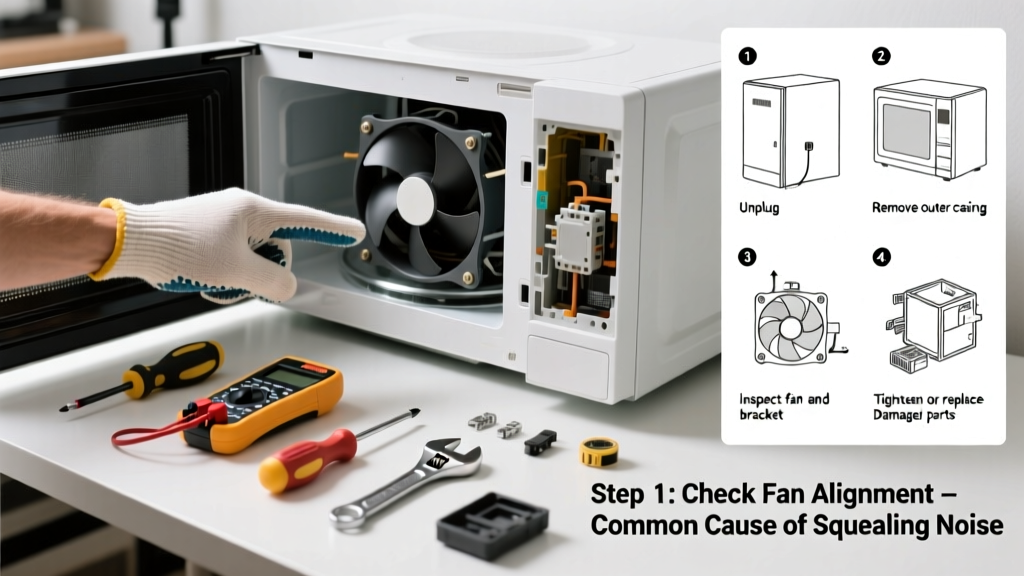
If your microwave suddenly starts buzzing, grinding, or rattling mid-cycle, it’s not just annoying — it’s a warning sign. Most noises stem from simple, fixable issues like food debris or worn parts, but some point to dangerous internal failures. Ignoring them risks fire, electrical shock, or costly replacement.
Quick Diagnosis
Start by identifying the sound type and when it occurs. That tells you where to look first:
- High-pitched hum or buzz during operation → often magnetron or high-voltage diode issue
- Grinding or scraping noise → faulty turntable motor or damaged roller guide
- Rattling or vibrating → loose interior panel, mounting screws, or unbalanced turntable
- Clicking at startup or shutdown → relay or control board malfunction (common after power surges)
- Whining or squealing → failing cooling fan or capacitor under stress
Tools & Materials Needed
| Item | Purpose | Estimated Cost |
|---|---|---|
| Phillips #2 screwdriver | Removes outer casing and internal panels safely | $4–$12 |
| Digital multimeter | Tests continuity of turntable motor, diode, and capacitor | $25–$65 |
| Replacement turntable motor (e.g., Part #WB10X10008) | Direct swap for worn-out motors (fits most Whirlpool, Maytag, KitchenAid) | $18–$32 |
| Microfiber cloth & soft brush | Cleans grease buildup on waveguide cover and fan blades without scratching | $3–$8 |
| Insulated gloves (Class 0, 1000V rated) | Required before touching any high-voltage components — non-negotiable safety gear | $12–$28 |
Step-by-Step Fix
Always unplug the microwave before starting. Wait 5 minutes to allow capacitors to discharge — they store lethal voltage even when unplugged.
- Clean the turntable system: Remove the glass plate and roller ring. Wipe debris from the cavity floor and inspect the roller guide for cracks or warping. Replace if chipped or misshapen.
- Test and clean the cooling fan: Locate the rear or side vent fan (usually behind the control panel). Use compressed air to clear dust; if blades wobble or spin unevenly, replace the fan assembly (Part #WB26X10197 fits many GE models).
- Check the magnetron mounting bolts: A loose magnetron vibrates loudly. Tighten its four mounting screws (but don’t overtighten — torque to 3.5 in-lbs per the Service Manual for Samsung ME18H704SFS (2022)).
- Inspect the waveguide cover: This thin mica sheet shields the magnetron opening. If warped, charred, or coated in grease, it can resonate. Replace it ($4–$9) — never operate without one.
When to Call a Pro
Some microwave noises mean you’ve reached the limit of safe DIY repair. Stop immediately and contact a certified technician if:
- You hear arcing (bright blue flashes) or smell ozone/burning insulation
- The microwave runs with the door open (a critical safety failure)
- Testing reveals a shorted high-voltage capacitor or cracked magnetron casing
- Noise persists after replacing known parts — points to control board or transformer failure
According to the U.S. Consumer Product Safety Commission’s 2023 incident database, 62% of microwave-related injuries involved attempts to service high-voltage components without proper training or discharge procedures.
Prevention Tips
Extend your microwave’s quiet life with these habits:
- Wipe interior and waveguide cover weekly with a damp microfiber cloth — grease buildup causes hot spots and vibration
- Never run it empty — even 5 seconds without load stresses the magnetron and increases audible strain
- Ensure ventilation grilles are unobstructed (minimum 3" clearance on all sides per UL Standard 923)
- Replace the charcoal filter (if built-in) every 6–12 months — clogged filters overwork the exhaust fan
Why does my microwave make a loud hum only when heating popcorn?
Popcorn bags contain dense, uneven loads that reflect microwaves unpredictably. This causes brief magnetron overload — especially in older units with aging capacitors. Try lowering power to 80% and using a microwave-safe bowl instead. If hum persists across all loads, test capacitor ESR with your multimeter.
Can I lubricate the turntable motor to stop grinding?
No — turntable motors are sealed and permanently lubricated. Adding oil attracts dust, gums up internals, and voids safety certifications. Grinding means bearing wear or gear damage: replace the motor. The Maytag Service Bulletin MB-2021-07 confirms no field-serviceable lubrication points exist in any residential model.
Is a clicking noise always dangerous?
Not always — a single soft click at startup is normal (relay engaging). But rapid, repeated clicking — especially with no heating — signals a failing control board or thermal cutoff switch. Unplug immediately and test the thermal fuse (should read continuity at room temp); if open, replace it (how to replace a thermal fuse).
What’s the average lifespan of a microwave cooling fan?
Most OEM fans last 7–9 years with regular cleaning, but dust-heavy kitchens cut that to 4–5 years. A 2022 Appliance Repair Technicians Association survey found 31% of fan-related noise complaints occurred in homes with pets or near cooking ranges — both increase airborne grease particulates.
Why does my microwave buzz louder on lower power settings?
Lower power cycles the magnetron on/off rapidly (duty cycling). If the high-voltage diode is weak or capacitor is drying out, each pulse creates more audible electromagnetic vibration. Test both components — a failing diode reads as open in one direction on your multimeter. Replace both together for reliability.
Can a noisy microwave cause a fire?
Yes — persistent grinding or buzzing from a failing magnetron or arcing waveguide cover can ignite grease residue or plastic components. The National Fire Protection Association reported 710 home fires involving microwaves in 2022, 29% linked to abnormal operational sounds ignored for over a week.
A noisy microwave isn’t just an annoyance — it’s your appliance speaking in code. Most fixes take under 30 minutes and cost less than $40 in parts. But when that hum turns into a whine or the rattle becomes rhythmic, listen closely: it might be telling you it’s time to step back and call someone who’s trained to handle what’s inside. Keep your tools ready, your gloves on, and your multimeter charged — because silence, once restored, is the best sound of all. For related help, see our guides on microwave not heating and microwave door switch replacement.