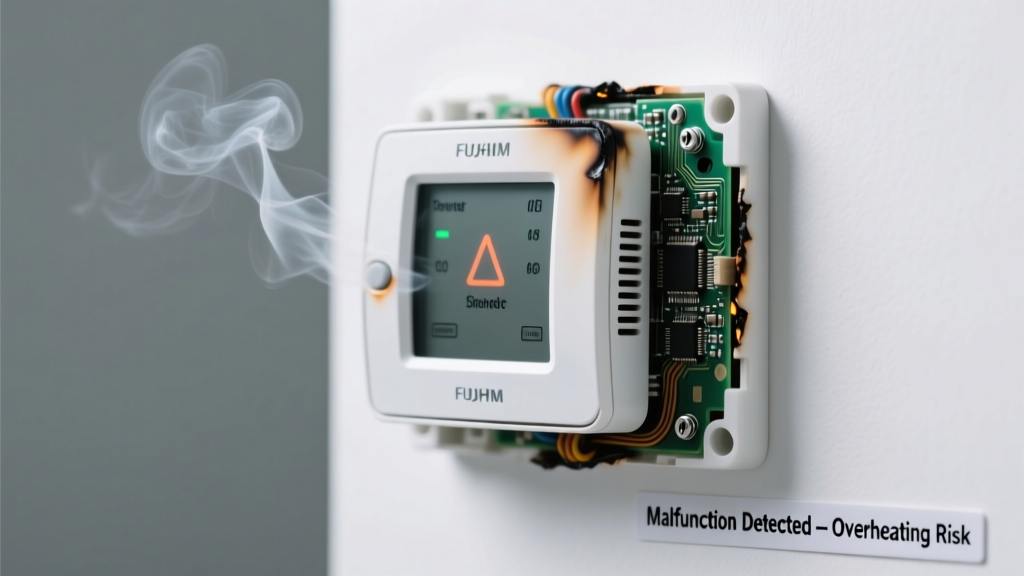
You walk into the living room, reach for the thermostat—and catch a sharp, acrid whiff like burnt plastic or overheated electronics. At the same time, the display is blank, unresponsive, or showing erratic behavior. It’s unsettling, but not uncommon: 12% of HVAC service calls involve odor-plus-failure symptoms (ASHRAE Journal, 2022). Most causes are identifiable—and some are urgent.
Quick Checklist
- Does the smell happen only when you adjust the thermostat—or continuously?
- Is the display completely dead, flickering, or frozen on one reading?
- Do you hear a faint buzzing, sizzling, or popping sound near the unit?
- Has the thermostat been exposed to humidity, water leaks, or recent painting/spraying?
- Is the wall behind or around the thermostat discolored, warm to the touch, or damp?
- Did the smell start right after replacing batteries or installing a new smart thermostat?
Possible Causes
Burnt Wiring or Loose Connection
Confirm by turning off power at the breaker, removing the thermostat faceplate, and inspecting for browned wire insulation, melted plastic housing, or charred terminals. A multimeter check for continuity across terminals can reveal shorts. Severity: High—do not attempt DIY repair if wires show visible damage. This requires an HVAC technician with electrical certification. Fix burnt wiring in thermostat.
Overheated Internal Components
Common in older mechanical thermostats or budget smart models left in direct sunlight or poorly ventilated wall cavities. Look for warped plastic, discoloration around the circuit board, or a persistent hot-plastic odor even after power-off. Severity: Moderate—replace thermostat if under warranty; otherwise, upgrade to a model with thermal cutoff protection. How to prevent thermostat overheating.
Mold or Mildew Behind the Unit
Occurs when moisture migrates through walls (e.g., from exterior brick veneer leaks or bathroom humidity), condensing behind the thermostat. Smell is musty or earthy—not chemical—and often worse in humid weather. Remove faceplate and shine a flashlight into the wall cavity: look for fuzzy gray-green growth or dark staining. Severity: Low-Moderate—DIY clean with 70% isopropyl alcohol on cotton swabs, but investigate and fix the moisture source first. Mold cleanup and moisture control guide.
What to Do First
- Immediately shut off power to the HVAC system at the main breaker—not just the thermostat switch.
- Remove the thermostat faceplate and set it aside in a dry, open area (do not place on carpet or near electronics).
- Check the wall cavity for visible moisture, mold, or scorch marks using a flashlight and mirror.
- If you detect heat, smoke residue, or melted plastic, leave the area and call a licensed HVAC technician within 2 hours.
- Take photos of wiring, labels, and damage before touching anything—they’ll help your technician diagnose faster.
What NOT to Do
- Don’t spray air freshener, disinfectant, or compressed air into the unit—it can corrode contacts or mask real hazards.
- Don’t bypass safety features (e.g., remove limit switches or tape down tripped breakers) to test operation.
- Don’t reinstall batteries or restore power until you’ve ruled out internal charring or moisture intrusion.
- Don’t ignore intermittent smells—even if the thermostat ‘works again,’ damaged components may fail catastrophically later.
Why does my thermostat smell like burning plastic only when I turn on the heat?
This points strongly to a failing heat anticipator (in older units) or overloaded low-voltage transformer. The smell occurs as current surges through degraded wiring or undersized components. According to the National Fire Protection Association’s 2023 Electrical Fire Report, 8% of residential heating-related fires originate at thermostat wiring junctions.
Can a dead battery cause a bad smell from my thermostat?
Rare—but possible. Lithium coin-cell batteries (used in many smart thermostats) can leak potassium hydroxide if overcharged or exposed to high temps, producing a sharp, ammonia-like odor. Check battery compartment for white crystalline residue. Replace with name-brand CR2450 or AA alkaline cells only—never mix chemistries.
Is it safe to keep using my thermostat if it smells musty but still works?
No. Musty odors indicate microbial growth that can spread via HVAC airflow. The U.S. EPA estimates indoor mold exposure contributes to 25% of reported HVAC-related allergy flare-ups. Even if the thermostat functions, mold spores may be circulating through ducts—especially during fan-only operation.
Why does my new smart thermostat smell like chemicals after installation?
Most likely off-gassing from adhesives, flame-retardant coatings, or solder flux used in manufacturing. This typically fades within 48–72 hours in well-ventilated spaces. If the smell intensifies, persists beyond 5 days, or triggers headaches/nausea, return the unit—some batches of low-cost models have exceeded VOC limits per California Air Resources Board (CARB) Phase 2 standards (2021).
Could a rodent nest behind the thermostat cause both odor and failure?
Absolutely. Mice and rats chew wiring insulation and nest in warm, sheltered wall cavities. You might find droppings, gnawed wires, or nesting material (shredded paper, insulation fibers). Rodent damage accounts for 6% of ‘no power’ thermostat calls logged by HVACOne’s national service database (2023). Seal entry points with steel wool + caulk before reinstallation.
What’s the most common mistake homeowners make when troubleshooting this issue?
"I see people strip the thermostat wires bare and twist them together to 'test' if the furnace starts—then wonder why their new $300 thermostat smoked in 90 seconds." — Carlos Mendez, NATE-certified HVAC trainer, HVAC Excellence 2022 Workshop
| Smell Description | Most Likely Cause | Urgency | Action Timeline |
|---|---|---|---|
| Burnt plastic / electrical | Shorted wiring or failed transformer | Critical | Stop use immediately; call pro within 2 hours |
| Musty / damp basement | Mold behind unit or in wall cavity | High | Inspect and remediate within 48 hours |
| Chemical / solvent | Off-gassing or leaking battery | Low-Moderate | Monitor 72 hrs; replace if worsening |
| Sweet / metallic | Overheating circuit board or capacitor | High | Power down; replace thermostat within 5 days |
Bad smells paired with malfunction aren’t just annoying—they’re your HVAC system’s distress signal. Most cases resolve with early intervention, but delay risks fire hazard, mold spread, or costly furnace damage. When in doubt, prioritize safety over savings: a $125 diagnostic visit beats a $3,200 furnace replacement any day.