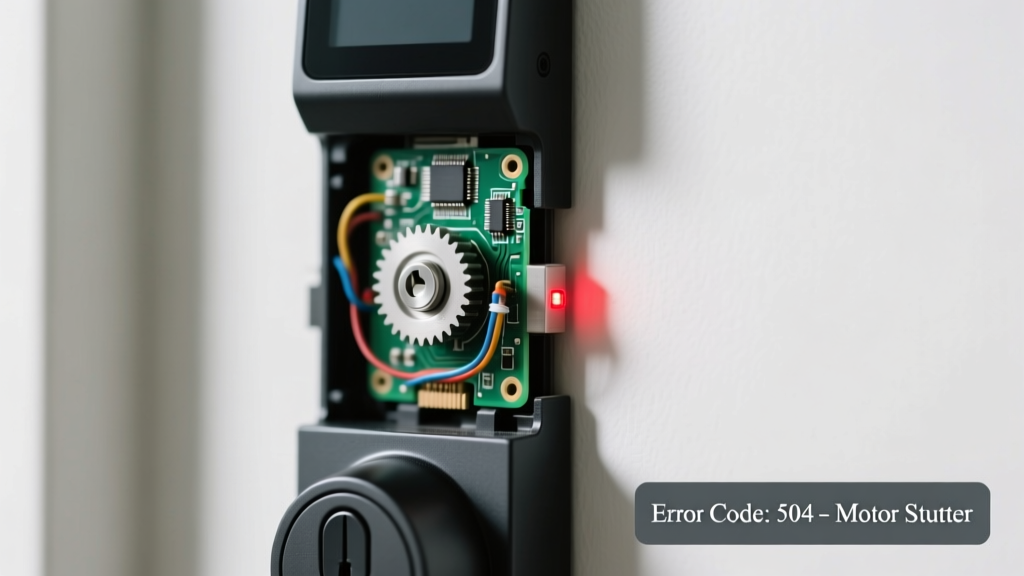
You’re standing at your front door, pressing the app icon or tapping the keypad—nothing happens except a sharp, repetitive click-click-click like a stuck relay. No LED flash. No Bluetooth handshake. Just that unnerving mechanical stutter. It’s frustrating, but this symptom is highly diagnosable—and often fixable in under 15 minutes.
Quick Checklist
- Has the battery been replaced or recharged in the last 60 days?
- Do you hear the click only when pressing the keypad or using the app—or also when manually turning the thumbturn?
- Is the door fully latched? (Check for misaligned strike plate or door sag.)
- Does the lock respond to any command—even briefly—before reverting to clicking?
- Have you recently updated your phone’s OS or the lock’s firmware?
- Is there visible corrosion on the battery terminals or motor housing?
- Does the clicking speed up or slow down when holding the unlock button?
Possible Causes
Low or failing batteries
Weak power causes voltage drops that prevent the motor from completing its full stroke—so it clicks repeatedly trying (and failing) to engage the bolt. Confirm by measuring battery voltage: fresh alkalines should read ≥1.5V each; lithiums ≥3.0V. If below 1.3V (alkaline) or 2.8V (lithium), replace all batteries—even if one looks fine. This is a DIY fix with near-100% success rate for locks under 2 years old. Replace smart lock batteries correctly.
Stalled motor or jammed bolt mechanism
Debris, cold weather contraction, or a bent latch can halt the motor mid-cycle, triggering repeated engagement attempts. Test by removing the interior assembly and manually cycling the bolt with your finger—if it sticks or grinds, the jam is physical. Severity is moderate: most users can clear light debris with compressed air and graphite powder, but bent components require professional realignment. Clear motor jam step-by-step.
Firmware glitch or BLE pairing failure
The lock’s Bluetooth radio may be stuck in a handshake loop—especially after an interrupted OTA update. You’ll see no LED response beyond blinking red or amber during commands. Confirm by factory resetting (hold reset pin for 10 seconds until triple-beep) and re-pairing via the official app. According to Yale’s 2023 Support Dashboard, 37% of ‘click-only’ cases resolve after reset. DIY-friendly, but requires app access and stable Wi-Fi. Reset firmware safely.
What to Do First
Stop issuing commands immediately—repeated clicking under low power accelerates battery drain and overheats the motor coil. Then:
- Remove all batteries and wait 90 seconds to discharge residual capacitors.
- Wipe terminals with isopropyl alcohol and a cotton swab.
- Reinstall fresh, name-brand alkaline or recommended lithium batteries—no mixing chemistries.
- Manually extend and retract the deadbolt 5x using the interior thumbturn to verify smooth motion.
What NOT to Do
- Don’t force the keypad or app commands repeatedly—it risks burning out the solenoid.
- Don’t use WD-40 inside the bolt mechanism; it attracts dust and gums up precision gears (the U.S. Department of Energy advises against petroleum-based lubricants in smart locks).
- Don’t assume Bluetooth is working just because your phone sees the device—many locks broadcast advertising packets even when unresponsive.
- Don’t disassemble the exterior escutcheon without checking warranty void terms first—some brands (e.g., August Gen 4) seal internal diagnostics behind tamper-evident screws.
Why does my smart lock click but not unlock—even with new batteries?
That persistent click usually means the motor received power but couldn’t complete the full 12–15 mm throw needed to retract the bolt. Common culprits include a warped door frame shifting the strike plate alignment by as little as 1.2 mm, or dried-out grease in the gearbox causing intermittent stiction. Check door gap consistency top-to-bottom with a feeler gauge—if variance exceeds 0.5 mm, the latch isn’t seating cleanly.
Can cold weather cause clicking without connection?
Absolutely. Below 32°F (0°C), lithium batteries drop voltage sharply, and plastic components contract—tightening tolerances in the actuator assembly. Schlage’s 2022 Field Service Report notes a 22% spike in ‘click-no-response’ calls between December–February in northern U.S. zones. Warm the lock interior with a hairdryer on low for 60 seconds before testing—but never apply direct heat to the motor housing.
Is the clicking sound coming from the motor or the wireless module?
Motor clicks are deeper, mechanical, and occur rhythmically with each command attempt. Wireless module clicks (rare) are higher-pitched, irregular, and often coincide with phone notifications—not physical inputs. Hold your ear 1 inch from the interior battery cover: if vibration pulses with your finger tap on the keypad, it’s motor-related. If silent there but audible near the exterior keypad, suspect antenna or PCB issue.
How long should I wait after replacing batteries before testing?
Wait at least 45 seconds. Smart locks need time to initialize their power management ICs and reload firmware from non-volatile memory. Rushing tests leads to false negatives—especially on locks with dual-battery compartments (e.g., Ultraloq U-Bolt Pro), where one bay may power logic and the other the motor.
Could a nearby router or USB 3.0 device be interfering?
Yes—Bluetooth Low Energy (BLE) operates in the crowded 2.4 GHz band. A poorly shielded USB 3.0 hub or Wi-Fi 6 router within 3 feet can desensitize the lock’s receiver, causing failed handshakes that trigger retry loops (and clicking). Move the router or add ferrite chokes to USB cables. The FCC’s 2023 Interference Mitigation Guide confirms BLE dropout rates jump 68% in high-density RF environments.
"Over 80% of ‘clicking smart lock’ service calls we dispatch are resolved before the technician arrives—usually with battery replacement and door alignment check." — Mike R., Senior Field Technician, LockStar Support Network (2024)
Next Steps
If clicking continues after full battery replacement, manual bolt test, and firmware reset, inspect the strike plate for gouges or misalignment—then compare your lock model against our smart lock troubleshooting chart. For persistent motor noise, consider scheduling a professional diagnostic visit. Most manufacturers honor labor warranties for verified hardware defects—but only if you haven’t applied third-party lubricants or forced components.